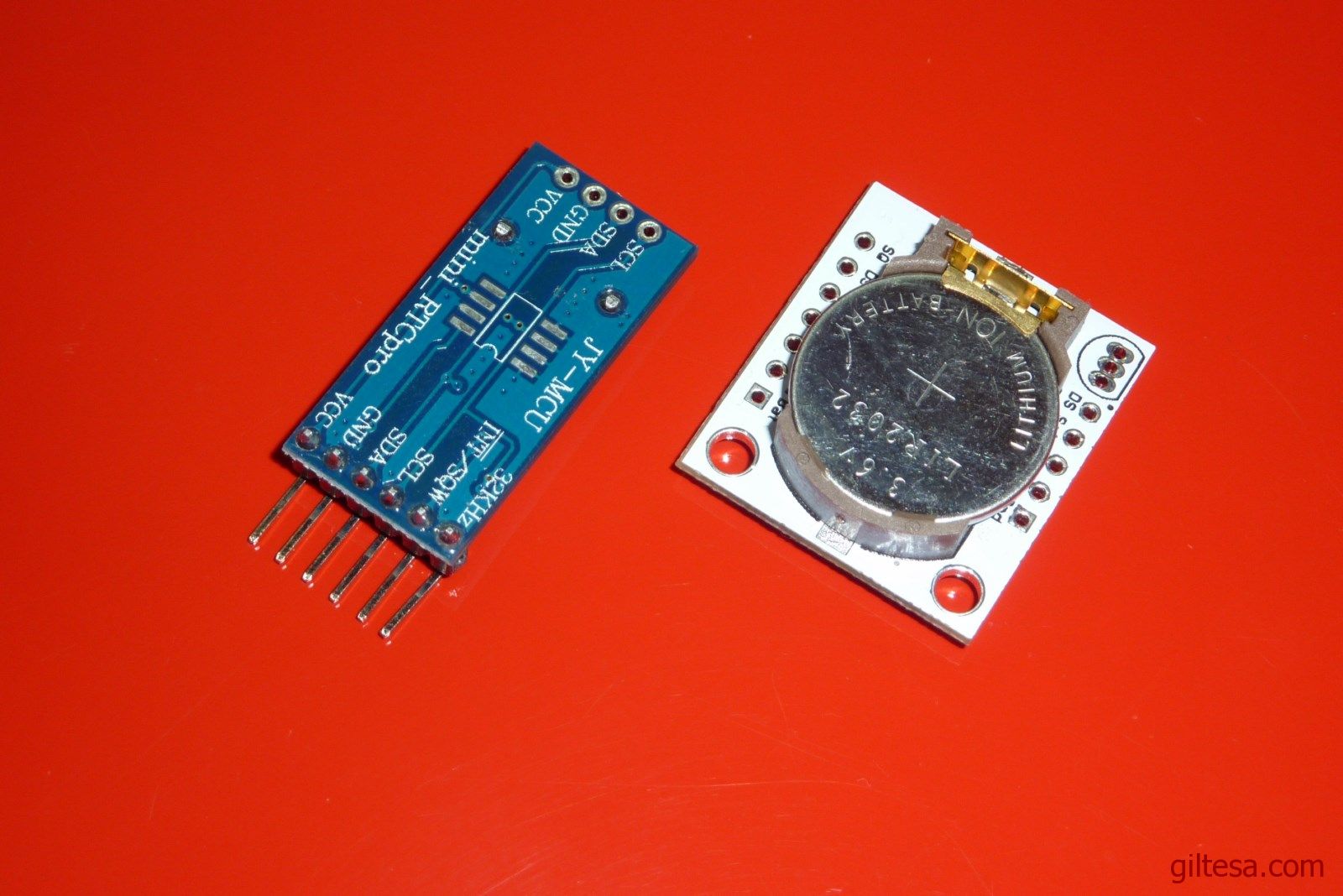
Después de probar bastantes de las librerías disponibles para este reloj y de que no me convenciera ninguna por su forma de funcionar, decidí programar mi propia librería basándome en el código que use en mi primer RTC.
Ahora al estar todo en una librería es mucho mas cómodo de usar que antes y tiene los métodos necesarios para poner el reloj en hora u obtener sus datos.
Este es uno de los ejemplos incluidos en la librería:
1 2 3 4 5 6 7 8 9 10 11 12 13 14 15 16 17 18 19 20 21 22 23 24 25 26 | #include <Wire.h> #include <RTC.h> RTC rtc(DST_ON); void setup() { Serial.begin(9600); while(!Serial); delay(1000); } void loop() { Data d = rtc.getData(); Serial.print(d.year); Serial.print("/"); Serial.print(d.month); Serial.print("/"); Serial.print(d.day); Serial.print(" "); Serial.print(d.hour24h); Serial.print(":"); Serial.print(d.minutes); Serial.print(":"); Serial.println(d.seconds); delay(1000); } |
- Añadida compatibilidad con los IDEs mayores o igual al 1.0
- Añadido soporte para el RTC DS3231
- Añadido método para poder obtener la temperatura del DS3231
- Hay disponible una entrada en el blog sobre esta versión aquí.
- Soporta todas las versiones del IDE de Arduino
- Soporta tanto el reloj DS1307 como el DS3231
- Reescrita la librería casi de cero.
- Permite cambiar cada parámetro del reloj de forma individual o conjunta.
- Permite obtener los datos de forma individual o como String con formato predefino o el que se indique.
- Soporta el cambio de horario de verano/invierno de forma automática. (Es necesario hacer al menos una lectura por hora para que el cambio se haga efectivo.)
- Añadidos nuevos métodos de comparación para el objeto Data (Más info)
- isAfter
- isBefore
- isBetween
He publicado el código en GitHub, si saco tiempo me gustaría revisar/probar algunos errores que me habéis comentado y también rehacer la librería entera, pero por ahora no tengo tiempo ni la necesito usar en ningún proyecto como para invertir tiempo en ella. Si alguien encuentra algún error puede notificarlo en GitGub y lo revisare.
una pregunta con que arduino hiciste la prueba es que quiero saber por que tengo un arduino uno y como el reloj se comunica por serial quería saber si voy a tener ademas incluir la librería para emular puertos series de arduino, agradezco desde ya la atencion
Hola, las pruebas las he hecho con un Uno, Pro Mini, Mega y Leonardo. Y el módulo no se comunica por Serial si no por I2C. Saludos.
Gracias y si me di cuenta algo tarde aun así muchas gracias por la atención
Hola, como tienes solucionado los atrasos o avances del reloj, en mi caso cada dia se adelanta un segundo.
Hola,
Es problema del hardware del DS1307, no de la librería. Si quieres tener un tiempo preciso necesitaras un DS3231.
Saludos.
GILTESA muchisimas gracias por tu blog, me ayudaste a resolver un problema con un reloj en tiempo real arduino, a mi me gusta compartir mis pocos conocimientos con la comunidad pero me gusta agradecer a la gente que como tu ayudan de manera desinteresada. excelente te doy 100 estrellas *************
Muchas gracias por tu libreria, es muy buena, casi me vuelvo loco con la precisión del reloj ¡¡¡10 puntos!!!
Muy buenas tardes.
Lo primero de todo felicitarte por este estupendo blog. Estoy empezando con Arduino y desde el primer momento estás en «mis favoritos» para consultas y librerías.
Te comento mi situación: estoy transmitiendo por RF temperatura con un DHT22 (temperatura exterior) y funciona a la perfección. En el emisor tengo todo conectado a un Arduino UNO y el receptor es un Mega. El problema viene cuando en el Mega presento en el LCD 20×4 la hora, fecha y temperatura desde un DS3231. Me «imprime» ciertos caracteres que yo no he dado instrucción para que lo haga y todo ello en las líneas en las cuales se presentan los datos tomados desde el RTC. Si elimino del sketch dichas líneas los caracteres no salen.
El DS3231 por sí solo funciona correctamente ya que fue lo primero que comprobé.
¿Sabes a qué puede deberse?
Un saludo y gracias!
Hola,
He hecho la prueba con un LCD de 16×2 y funciona correctamente, tu problema tiene que ser otra cosa.
Te dejo el código que he usado de prueba:
Saludos.
Gracias por la respuesta.
Como ya te he comentado, el problema ya sé que no es de tu librería, ya que anteriormente, y para probar el módulo, la utilicé y funciona perfectamente.
Lo curioso es que ahora, si aplico tu sketch junto con el que yo tengo, se visualiza la temperatura pero la hora tarda en visualizarse y cuando la hace el tiempo no corre, cuando nada más que tu ejemplo funciona muy bien y sin los caracteres raros que me salen.
El código no parece que se haya pegado por completo (limitaciones del blog para los invitados). Prueba a usar https://gist.github.com o http://www.codeshare.io para la próxima vez.
La linea: if( millis()%1000 == 0 ){} que te puse en el ejemplo lo que hace es refrescar la pantalla con los datos del reloj una sola vez por segundo.
Puedes meter todo el código dentro de ese if, o eliminarlo, pero si refrescas la pantalla demasiado rápido se vera mal o parpadeara. También parpadeara si usas en el loop el método lcd.clear() demasiado rápido.
A ver ahora. Quitando el «if» se ha solucionado lo de la fecha y hora, pero me siguen apareciendo los caracteres en la línea 2.
Puedo vivir con ello, pero es por dejarlo bien visualmente.
Se agradece la ayuda prestada.
Un saludo
No sera que entre cada iteración del loop se te quedan caracteres de la impresión anterior?
O quizás estés imprimiendo algún carácter que no este en la codificación ASCII1 que es la que usa el LCD?
Prueba también a limpiar la pantalla, bien con un lcd.clear(), o mejor aun imprimiendo caracteres en blanco después de imprimir los datos.
lcd.print("2015/03/10 ");
https://gist.github.com/4249baedae98eaa54710
Ahí dejo el link para el sketch. Mañana probaré lo que me dices, que ahora voy a cenar porque me estoy obcecando y ya no pienso con claridad.
Muchas gracias de nuevo por la ayuda.
Ya comentaré si al final lo he solucionado y cómo.
Un saludo
Te he hecho un fork en tu código, te dejo el enlace directo: https://gist.github.com/giltesa/9ee614cd717c3cc31623
Prueba a ver si con eso te funciona.
Saludos!
Muy buenas.
Acabo de probar tu código y funciona a la perfección, sin caracteres raros.
¿Puede ser porque a la hora de indicarle que imprimiera los iconos yo lo hacía con un «print» en lugar de con un «write»?
Muchas gracias por la ayuda.
A ver si lo voy puliendo para hacerle un menú donde poder configurar la hora y la fecha mediante pulsadores y diferentes formas de presentación.
hola, me ha funcionado perfectamente, una consulta como puedo hacerlo para que el reloj me avise cada 1 hora ( me imagino que restando horas o algo asi)
tengo que hacer un sistema que cada una hora parta un motor, priomero a la izquierda otra hora a la derecha y asi sucecivamente, me puedes orientar
Por ejemplo se puede hacer asi:
Saludos.
Gracias por responder
Debo interpretar q en donde dice y if(d.minutes=…..,) pregunta si sin cero
Y en if(d.hour24h%2…
Pregunta si han pasado 2 horas
Estoy en lo correcto
Bueno la lógica es
1._ en automático(con un selector manua automático, comienza la cuenta de 1 hora,
2. Pasado esa hora el.motor gira derecha(ya lo tengo).
3._ una vez q el motor se detiene comienza la cuenta nuevamente de una hora
Pasa esa hora y gira a la izquierda
Espero hacerme entender
Juka
La primera parte controla que la acción de izquierda o derecha solo se ejecute una vez cada hora, cuando los minutos y segundos estén a 0.
La segunda parte ejecuta izquierda o derecha dependiendo de si la hora es divisible por dos o no.
Aquí te explican cómo programar.
Saludos.
hola, disculpa todas las molestias, pero el enlace no funciona, tienes otro que me puedas dar o mi correo es jukaceledon@gmail.com, gracias desde ya.
Es un enlace de Dropbox, debería de funcionarte. Te dejo otro:
Hola, disculpa que vuelva a preguntar , no se si se publico la anterior por eso la repitto, pero no he podido hacer con el rtc, que cada 5 minutos me active una salida:
es decir pongo en uno la condicion, pasan 5 minutos y activo una salida por ejemplo motor derecha, luego que este motor se pare con entrada fin derecha, pase 5 min, active otra salida motor izquierda, cuando pare por entrada fin izquierda, pasen 5 minutos y vuelva activar motor derecha y asi sucesivamente
Espero me puedas ayudar
Juan carlos
Es un problema sencillo y mas arriba ya te puse eso mismo pero con horas.
Comprueba la divisibilidad por 5 de los minutos y ya lo tienes.
Edit: Te añado el código pero estas cosas ya están explicadas en el manual de C que te pase…
A ver si entendi, cuenta 5 minutos, al terminar el flag pasa a verdadero gira a la derecha, caso contrario (flag falso) gira a la izquierda, estoy en lo correcto.
La duda es la siguiente, cuando comienza a contar el tiempo.
La logica es cuando pin 5 pasa a uno (esta en cero), comienza a a contar, pasan los 5 minutos ( aqui flag pasa a verdadero), gira derecha ( y funciona hasta que un pin 6 este en uno (fin de carrera)).
una vez que se detiene debe pasar 5 minutos y cuando nuevamente flag sea verdadero activa giro a la izquierda y funciona hasta que lo detiene un pin 7 en uno (otro fin de carrera)
Espero me puedas ayudar
Hola, ya entendi la logica y pude hacerlo funcionar, pero me sucede lo siguiente, cuando pasan 5 minutos se activa a la derecha y luego a la izquierda, en el mismo instante y esto dura un minuto, la consulta es la sigueente, como lo hago para que gire a la derech o izquierda primero y despues a la izquierda y no por un minuto sino que mas puede ser 10 minuos (la condicion izquierda y la condicion derecha)
La impresion que me entrega en el monitor es este:
lectura reloj 18:12:21
condicion derecha
lectura reloj 18:12:22
condicion izquierda
Espero me puedas orientar
Juan Carlos
GILTESA, gracias por su paciencia, logre hacer que cada una hora me de la condición, lo que no he podido hacer que cuando la condición derecha funcione a lo menos 5 min, Ud. dice si la hora es divisible, es decir si quiero 5 min, debería ser por divisible por 12, pero no me funciona, puede orientarme un poco mas por favor
Si quieres que cada 5 minutos se ejecute, entonces tendrá que ser divisible por 5, no por 12
minutos % divisor = resto
0%5 = 0 (se ejecuta)
1%5 = 2
2%5 = 4
3%5 = 6
4%5 = 8
5%5 = 0 (se ejecuta)
6%5 = 2
7%5 = 4
8%5 = 6
9%5 = 8
10%5 = 0 (se ejecuta)
11%5 = 2
12%5 = 4
13%5 = 6
14%5 = 8
15%5 = 0 (se ejecuta)
16%5 = 2
…
…
60%5 = 0 (se ejecuta)
Te recomiendo que uses el monitor serial y que imprimas ahí cuando entras o dejas de entrar en cada parte de código.
Primero darle las gracias por responder, si efectivamente ya había hecha esa prueba de imprimir en el monitor serial, y logre hacer cada 5 minutos y una hora.
Todo bien hasta aquí, la duda que tengo ahora, al ejecutarse, solo lo hace por 1 segundo, y necesito que por lo menos se ejecute por 5 minutos o mas, se puede y como?
O deberia usar interrupciones, me puedes orientar
Gracias
Por eso te puse lo del if(flag) para que en cada ejecución cambiara a izquierda o derecha. Hasta que no vuelva a entrar pasado ese tiempo, lo que hayas hecho en ese if seguirá vigente.
Lo q hice es lo q me indico
Pero lo q me imprime es
Cada 5 minutos entra al la condición
Pero así
Seg 01 derecha
Seg 02 izquierda
.
.
.
.
Seg 58 derecha
Seg 59 izquierda
Seg oo no hace nada
Espera los 5 min y repite
Y no lo q ud me indica q debería hacer q estaré haciendo mal
If ( d.minutes % 5 == 0)
{
If (flag)
{
Flag = false;
Serial.print(«DERRCHA»;
}
else
{
Flag = true;
serial.print («izquierda»);
}
}
Es normal, es el flag quién te indica en el estado en el que estas.
Si quieres ejecutar una vez izquierda o derecha cada 5 minutos, o encender y apagar un pin/led cada 5 minutos pues puedes poner todo el código dentro de ese if.
Sin embargo si quieres una ejecución constante de izquierda o derecha entonces has de usar otro if cuya condición es también el flag, y que se encuentre fuera del if del resto de 5 minutos. Así se ejecutará en cada interacción del loop.
Disculpe, pero no entendí muy bien, para la condición constante, con motivo es lobdel if?????
Estimado GILTESA, ,uy agradecido de su tiempo y ayuda, segui al pie de la letra lo que me indico
void loop()
{
Data d = rtc.getData();
Serial.println( d.toString() );
delay(1000);
if( d.minutes % 60 == 0 ) AQUI REALIZABA LOS CAMBIOS
{
if( flag)
{
flag = false;
Serial.println(«esta en izquierda»);
}
else
{
flag = true;
Serial.println(«esta en derecha»);
}
}
if ( flag )
{
Serial.println(«izquierda»);
digitalWrite(movderecha,LOW);
digitalWrite(movizquierda,HIGH);
Serial.print («derecha = «);
Serial.println(digitalRead(movderecha),DEC);
Serial.print («izquierda = «);
Serial.println(digitalRead(movizquierda),DEC);
}
else
{
Serial.println («derecha»);
digitalWrite(movderecha,HIGH);
digitalWrite(movizquierda,LOW);
Serial.print («derecha = «);
Serial.println(digitalRead(movderecha),DEC);
Serial.print («izquierda = «);
Serial.println(digitalRead(movizquierda),DEC);
}
}
Los resultados fueron
1.- Se cumple siempre el tiempo de cambio.
2.- La secuencia no, es decir los patrones para cada tiempo ( lo hice para 5, 10 15, 30 y 60 minutos), son simepre diferente y deberian serç
Derecha
izquierda
derecha
….etc,
pero resulta
Derecha
Izquierda
Dercecha
Derecha
Izquierdaç
Derceha
Derecha
Dercecha
izquierda
Derceha
izquierda
Derecha….. as i sucesivamente, a veces son 3 derechas seguida, otras 2 veces seguidas, pero siempre diferentes.
es Normal esto existe algun problema
Hola Juan Carlos,
Los problemas que tienes no son relacionados con el uso de la librería, así que esta sera mi ultima respuesta aquí ya que estamos ensuciando la entrada con comentarios que no aportan nada al resto de gente. Si aun necesitas mas ayuda pásate por aquí.
El código que te he puesto cumple con lo que querías, en este caso en vez de minutos he usado segundos. Como puedes ver el patrón de salida es siempre el mismo.
– Cada 5 segundos se modifica el flag y se avisa de ello.
– Y cada 1 segundo se imprime el estado del flag con el texto izquierda/derecha.
La única posibilidad de que el patrón sea distinto es al arranque del Arduino, ya que el tiempo del RTC puede no coincidir, pero eso solo pasa hasta que se cambia el flag, porque el tiempo vuelve a ser divisible. (los dos primeros Izquierdas)
no tiene métodos para alarmas?
De momento no, aunque es algo que quiero añadir en siguientes versiones.
Muy práctico tus librerias y entretenido tu foro… yo ando tratando de hacer guardar una hora (la que yo elija) en la memoria eeprom para que luego se active un led.
Hola, lo primero dar las gracias por compartir el trabajo que haces con tus librerías, he cargado la ultima versión para mi DS3231 y todo va bien hasta que el segundero llega a 59, a partir de aquí la secuencia es 09,19,29,39,49,59,69,79,89,99,10,11,12…, no pierde ninguna segundo pero los muestra erroneamente.
Lo has podido notar anteriormente? Gracias por todo de nuevo.
Hola,
No, no he tenido ese problema. ¿Eso te pasa con los códigos de ejemplo? ¿Qué modelo de DS3231 es?
Saludos.
Hola y gracias por tu rápida respuesta, el código utilizado es el que pones arriba en esta página, modificado y adaptado para displayar en un LCD 16×2 junto con las medidas tomadas por un DHT22
El modelo de DS… Lo único que veo en el circuito impreso es ZC-042, supongo que será esto!
También te falla con los ejemplos incluidos en la librería? Se me hace raro que pase eso.
Saludos.
Hola, al importar tu librería, me da el siguiente error:
Exception in thread «AWT-EventQueue-0» java.lang.IllegalArgumentException: MALFORMED
at java.util.zip.ZipCoder.toString(ZipCoder.java:58)
at java.util.zip.ZipFile.getZipEntry(ZipFile.java:567)
at java.awt.EventDispatchThread.pumpEvents(EventDispatchThread.java:93)
at java.awt.EventDispatchThread.run(EventDispatchThread.java:82)
Hola,
No la importes desde el IDE, descomprime el zip y copia la carpeta «DS1307_DS3231» dentro de la carpeta de librerías del IDE.
Saludos.
Hola
Antes de nada, la librería me ha sido muy útil.
Sólo un posible cuasi-bug, podría ser de mi programa tambien perfectamente.
Si cambias la hora actual a justo antes de una fecha de cambio a horario de invierno p.e., ejecuta el cambio de horario con normalidad pero si después vuelves a cambiar a otra de mismo tipo de cambio de horario no lo ejecuta, esto supongo que es normal.
Pero por otro lado, si cambias la hora actual hacia el pasado pasando por al menos dos cambios horarios tampoco vuelve ha hacer bien los coambios de horario.
Este posible bug no supone nada en la ejecución normal del programa, solo cuando estas haciendo muchas pruebas con diferentes fechas de cambio de horario.
Saludos
Y GRACIAS!!
PD: Repito, podría ser de mi programa.
Hola Julio,
Los días en los que se ha de cambiar la fecha solo se calculan al encender el Arduino y tras cada cambio de fecha. Por ello si haces muchos cambios raros pudiera ser que el código deje de calcular los datos correctamente.
En la librería en el método RTC::checkDST puedes ver cómo calcula.
Saludos.
Buen día, primero que nada decir que me ha sorprendido esta librería, lo directa y simple que es, muy muy buen trabajo pero después de estar utilizándola me surgen algunas dudas:
1. Hay algún lugar donde pueda ver todas las funciones que tiene y los tipos de variables que necesita cada una? o al menos la función «rtc.setDateTime» que tipo de variables ocupa cada dato?
2. Leyendo por aquí vi que incluye el ajuste automático para el horario de verano e invierno, hay forma de desactivarlo?
Gracias
Hola Fernando,
Aquí tienes una breve explicación sobre la ultima versión de la librería.
Por otro lado, si con el editor de texto abres los ficheros RTC.h y RTC.cpp veras el código de la librería y cada método disponible con su comentario sobre qué hace.
Por ejemplo:
(Aunque veas expresados los parámetros de los métodos como por ejemplo: uint16_t year, puedes usar su nomenclatura mas estándar, que se muestra en el comentario, en tu código, por ejemplo: unsigned int year)
La librería también incluye ejemplos, en el primero de ellos podrás ver como iniciando la librería pasandole como parámetro la constante DST_ON o DST_OFF activas o desactivas el cambio de horario automático. También esta comentado en el código:
Saludos.
Estoy creando un proyecto utilizando un Arduino Uno, un lcd 2×16 y un RTCDS3231, el proyecto consiste en sonar un timbre escolar, para lo cual estoy utilizando la libreria TimeAlarms, mi pregunta es como puedo mandar a llamar el rtc en mi nuevo skech, eh intentado utlizar setSyncProvider(RTC.get); , pero no me lo permite.
Hola Edgar,
Tendrás que mirar el metodo setSyncProvider para saber que tipo de dato espera, no puede esperar un objeto de mi librería pues solo al tengo publicada aquí, y del resto de librerías de RTC no puede ser compatible con cada una… eso suponiendo que el parámetro sea de tipo «rtc» pues podría ser de otro tipo como un numero o string.
Si es para lo que dices, bastaría con añadir una condición if que comprobara que la hora, minutos y segundos es la que tu quieras, en ese caso suena la alarma el tiempo que quieras y después sale del if y no vuelve a sonar hasta que la hora minutos y segundos coinciden de nuevo.
Si tu programa hace mas cosas ademas de eso, ten cuidado al comprobar los segundos pues podría hacer que en ese momento exacto este ejecutando otra cosa y el tiempo se te pase…
Saludos.
Gran trabajo giltesa!!
Gracias por la Libreria funciona muy bien queria decirles que me aparecian 2 caracteres extraños en un LCD I2C después de los segundos lo que hice fue cambiar el lcd.println (d.seconds); por lcd.print (d.seconds); lo dejo por si a alguien le pasa. Saludos y gracias.
Hola,
Eso sucede porque el println además de imprimir el texto que le pasas también imprime el carácter de salto de línea, eso se puede hacer en el monitor serial pero no con las pantallas.
Saludos
Hola giltesa
La libreria va muy bien, lo unico es que no ha echo el cambio de hora automatico. Tengo entendido que lo hace automaticamente.
uan saludp
Hola Penguinparanoico,
Si, así es. Si la librería se instancia pasandole como parámetro la constante DST_ON, y además el Arduino hace como mínimo una lectura por hora, entonces en el momento de la lectura la librería debe cambiar la hora si es necesario. Como puedes ver en el vídeo de la entrada cuando llega el cambio de hora el cambio se realiza, cumpliendo esos dos requisitos debería de funcionarte.
Saludos.
Hola Giltesa.
Pues he mirado el codigo y en el inicio tengo puesto en ON..
RTC rtc(DST_ON);
Y hace una lectura cada segundo (es una especie de reloj despertador, por ahora sólo dá la hora).
Pero es cierto que he tenido que actualizar manualmente la hora.
Soy un novatillo es esto pero según veo en tu código haces el cambio basandote en el ; anño, mes y dia (funcion zeller), o estoy confundido.
Si estoy en lo cierto con retroceder al dia que se cambia la hora puedo hacer pruebas. Para saber si cambia la hora o si algo de mi código esta interfiriendo.
Gracias Giltesa. por lo demas, genial la libreria, buen trabajo.
Hola Giltesa:
Puede ser que al ejecutarlo desde la funcion loop() no funcione en cambio de hora??
un saludo, gracias
Hola,
Se ha de ejecutar obligatoriamente en el loop o una función llamada dentro del loop, no desde el setup. Revisa los ejemplos de la librería.
Saludos
Buenas primero que todo felicitarte, en mi caso yo ocupo manipular los dato de la siguiente manera:
Ocupo que la alarma se me active cada 8 horas, otra cada 12 horas y la ultima cada 24 horas.
Como lo podría hacer?
muchas gracias
Hola Alejandro,
Mediante código, sin usar las alarmas internas del reloj que aun no da soporte mi librería, seria algo así:
Saludos.
Hola, lo primero agradecer las pedazos de librerias que tienes, porque despues de casi un mes intentando poner el RTC 3231 en hora con montones de ellas era imposible, y buscando encontre por casualidad las tuyas.
Estoy intentando hacer que un rele se active y desactive segun el mes, dia y hora y no hay maneray eso que estoy utilizando tu libreria para ello. Adjunto el codigo, para ver si me puedes echar una mano. He intentado probar solo con la hora y minutos y tampoco me funciona. Puedes echarme una mano??
codigo:
#include
#include
int relay = 2;
RTC rtc(DST_ON);
int hour;
int minutes;
int Estadorelay = 0;
void setup()
{
Serial.begin(9600);
while(!Serial);
delay(1000);
pinMode(relay, OUTPUT); //salida rele
}
void loop()
{
// To set the clock from the IDE, enter the
// date and the time following this format: 2014 10 14 22 49 18
// Year, Month, Day, Hour24H, Minutes and Seconds
if( Serial.available() > 0 )
{
int year = Serial.parseInt();
int month = Serial.parseInt();
int day = Serial.parseInt();
int hour24h = Serial.parseInt();
int minutes = Serial.parseInt();
int seconds = Serial.parseInt();
rtc.setDateTime( year, month, day, hour24h, minutes, seconds );
while( Serial.available() > 0 && Serial.read() != -1 );
}
Data d = rtc.getData();
Serial.println( d.toString() );
delay(1000);
if(d.hour == 20 && d.minutes == 14){
digitalWrite(relay, HIGH);
}
if(d.hour == 20 && d.minutes == 15)
{digitalWrite(relay, LOW);
}
Serial.print();
if(Estadorelay == HIGH ){
Serial.print(» RELAY ON «);
}
else
{
Serial.print(» RELAY OFF «);
}
}
Un saludo y muchas gracias
Hola,
Si vas a comparar la hora 20 no puedes hacerlo con la variable hour que no diferencia entre AM y PM, y cuyo mayor valor es 11, has de usar d.hour24h
Saludos
Hola, muchas gracias por la respuesta, ya me di cuenta al leer luego las librerias detalladamente que tenia que poner d.hour24h.
Otra pregunta voy a utilizar la funcion milis() en lugar de los delay(), utilizando if ( (millis() – Old_Millis) > 7000) ¿¿hay alguna manera de llamar al reloj para que interactue a la hora marcada o solo con poner alguna vez : rtc.getData(); en el setup o en loop me serviria.?? Un saludo y muchas gracias de nuevo.
Pd: para cuando una libreria TimeAlarms made in GILTESA con meses y dias del mes??? Perdon por el atrevimiento. Saludos
Hola Luis,
Para ejecutar ciertos bloques del código cada cierto tiempo puedes hacerlo de diferentes formas:
Todas son formas validas de hacerlo, la ultima que también me comentas querré implementarla algún día espero mas pronto que tarde, aunque tampoco es imprescindible salvo que pongas al Arduino en modo reposo ya que en ese caso para despertarlo hace falta una interrupción que bien podría ser del RTC.
Saludos.
Hola, he intentao subir el codigo que estoy preparando aqui y no deja. Se lo he enviado creo que a su email
Puedes compartir el código en alguna pagina como:
https://gist.github.com
http://www.codesend.com
Le he echado un vistazo y donde tienes la llamada a rtc.getData(); esta bien, así en cada iteración te refrescara los datos de la fecha y hora.
http://www.codesend.com/view/25c536c9c35bb1f873029dafaf25dad2/
Saludos
Hola.
Estoy intentando conectar un ds3231 y un bmp180.
El probelma es que ambos se conectan en los mismos pins (A4 y A5)
Es posible combiarlos con tu libreria?
Saludos
Hola,
Puedes conectar tantos módulos I2C como quieras siempre y cuando las direcciones de acceso de los módulos no coincidan.
En este código de ejemplo conecto 5 módulos, 3 de ellos por I2C:
Saludos.
Muchas gracias por tu respuesta
Pensaba que esto era solo para las entradas digitales.
Aprovecho y te hago otra pregunta.
Cual e sel remplazo de la librería Wire en la ultima versión de Arduino?
Entiendo que es necesario para los componentes I2C. no?
saludos
En la version 1.6.6 creo que viene por defecto y tambien te abre una pagina para que actualices las librerias, y si no me equivoco creo que es una MAX…
Hola y feliz año para todos.
Giltesa,me pregunto si hay alguna manera de hacer con tu libreria esto:
if(Reloj.IsLater(9, 59) && Reloj.IsPrevious(21, 59))
He estado mirandola y no veo nada semejante.
Un saludo
Hola Luis,
No existían esos métodos en mi librería pero los acabo de añadir, esta es la lista de nuevos métodos para el objeto Data:
He añadido también el ejemplo número 8 en el que se hace uso de estos nuevos métodos.
Los he probado un poco y parece que funcionan correctamente.
Saludos.
Giltesa eres un crack, me ha servido al 100%.
tengo el problemilla ahora de los reinicios al fallo de corriente, pero espero pueda solventarlo y puedas añadirle algo a la libreria y ya seria la O….A. En serio muchas gracias Un saludo Luis
Hola, Giltesa cual seria la correcta de las dos para cambiarla, partiendo de la primera:
// primera: if(Reloj.IsLater( horas, minutos ) && Reloj.IsPrevious( horas, minutos ));
// esta: if(rtc.isAfter( hour24h, minutes )&&(rtc.isBefore( hour24h, minutes ));
// o esta: if(rtc.isAfter( d.hour24h,d. minutes )&&(rtc.isBefore(d. hour24h,d. minutes ));
Porque si la pongo con la hora y minutos no me haria falta nada mas que el isAfter y Is Before??
if(Reloj.IsLater( 13,15 ) && Reloj.IsPrevious( 13,18 )); el cambio seria este:
if(rtc.isAfter( 13,15 )&&(rtc.isBefore(13,18 ));
Un saludo y perdon por tanta pregunta.
cada vez que intento complilar me salen estosn errores, como si no reconociera de la libreria la expresion isAfter e isBefore. Si se lo pongo como «rtc.d.isAfter» me dice que la d no esta declarada.
In function ‘void loop()’:
error: ‘class RTC’ has no member named ‘isAfter’
if(rtc.isAfter( CFG.Luz1H_ON, CFG.Luz1M_ON ) && rtc.isBefore( CFG.Luz1H_OFF, CFG.Luz1M_OFF ))
error: ‘class RTC’ has no member named ‘isBefore’
if(rtc.isAfter( CFG.Luz1H_ON, CFG.Luz1M_ON ) && rtc.isBefore( CFG.Luz1H_OFF, CFG.Luz1M_OFF ))
error: ‘class RTC’ has no member named ‘isAfter’
if(rtc.isAfter( CFG.Luz1H_OFF, CFG.Luz1M_OFF ) && (Dimeo1 > 0) ){
Hola Luis,
Te recomiendo que eches un vistazo al ejemplo 8 de la librería, se muestra cómo se usan los métodos.
La forma más correcta seria:
Que significa que la hora de antes es menor/anterior a la hora almacenada en «d», y también que la hora de después es mayor/posterior de «d».
Todos los datos de fecha y hora, como los métodos de impresión y comparación están en la clase Data. La clase RTC es para acceder al hardware para recoger los datos o configurar unos nuevos.
Saludos.
Hola Giltesa. Me acaba de llegar un DS3231, ya que el DS1307 ya adelanta 5 minutos en un mes, aproximadamente (horrible). He probado la última versión de tu librería RTC.h y es una maravilla. Facilísmo establecer la hora, mostrar fecha y hora actual, etc. Me falta probar las alarmas. Felicidades y gracias por compartirla.
Saludos.
Giltesa, al cargar codigo de varias fechas no respeta la hora de encendido ni de apagado, te pongo la parte de codigo que me refiero:
if (d.month == 1 && d.day == 19){if(d.isAfter(21,6) && d.isBefore( 22,10)){
alba();} //llamada al alba
if(d.isAfter( 22,10) && (Dimeo1 > 0) ){
ocaso();}//llamada ocaso
}//fin dia
if (d.month == 1 && d.day == 20){
if(d.isAfter(19,45) && d.isBefore( 19, 55)){
alba();} //llamada al alba
if(d.isAfter( 19, 55) && (Dimeo1 > 0) ){
ocaso();}//llamada ocaso
}
Nada mas que cargas el codigo comienza con el alba, sin esperar a la hora marcada,ni asi ni asi tampoco.
if (d.month == 1) {if (d.day == 19){
if(d.isAfter(21,53) && d.isBefore( 22, 3)){
alba();}//llamada al alba
else
{ocaso();}//llamada ocaso
}//fin dia 19
if (d.day == 20){
if(d.isAfter(11,1) && d.isBefore( 12, 5)){
alba();}//llamada al alba
else
{ocaso();}//llamada ocaso
}fin dia
}//fin mes 1
Incluso probando asi, hace lo mismo, cargas el programa y comienza el alma….
if (d.month == 1) {if (d.day == 19){
if(d.isBetween (21,10, 22,10)){
alba();}//llamada al alba
else
{ocaso();}//llamada ocaso
}//fin dia 19
if (d.day == 20){
if(d.isBetween (22,10, 23,10)){
alba();}//llamada al alba
else
{ocaso();}//llamada ocaso
}
}//fin mes 1
un saludo
Los problemas vienen cuando comparas horas sin fechas, ya que para controlar el desbordamiento de la hora a media noche he tenido que hacer una adición de horas que no se debería de hacer, sin embargo sin ella la comparación de horas antes de media noche con horas de después de media noche da problemas, incluso por lo que veo con tu código con comparaciones en el mismo día.
Funciona bien las comparaciones si se hacen con fecha y hora pues tras pasar las 12 se cambia de día y eso da como resultado una suma de segundos mayor que la hora anterior por lo que no importa el desbordamiento de las horas pues se añade al día.
Añadí esa característica pero no he encontrado ningún ejemplo o comparador online que permita comparar horas sin fecha. Si encuentras algo puedo echarle un vistazo y corregir los fallos, por ahora he marcado la ultima versión de la librería como alpha.
Si puedo lo miro el fin de semana.
Ya le he dado solución, cuando no se indique la fecha en las comparaciones horarias se usara por defecto la fecha actual, si se quiere otra fecha se debe indicar el año, mes y día, antes de la hora, minutos y segundos en cualquiera de los tres métodos.
El ejemplo 8 esta actualizado con las nuevas sobrecargas.
Saludos.
Giltesa, entonces en el caso de un terrario por ejemplo, que gestione varias fechas y horas diarias cada vez que se cambie de año 2016 a 2017 y sucesivos, ¿se debería recargar el código cambiando el año????? O simplemente con no ponerle el año al programa serviría????
Mañana probare la librería y el cambio de código cambiándole el año. Un saludo y gracias
Los años no afectan en nada, la librería funcionara hasta el 2099 que es el limite del reloj.
Creo que no me he explicado bien:
En el caso este:
if (d.month == 1) {
if (d.day == 20){// día 20 del mes1
if(d.isBetween (21,10, 22,10)){
alba();}//llamada al alba
else
{ocaso();}//llamada ocaso
}//fin dia 20
if (d.day == 21){//día 21 mes 1
if(d.isBetween (22,10, 23,10)){
alba();}//llamada al alba
else
{ocaso();}//llamada ocaso
}
}//fin mes 1
Tendría que ponerlo asi, pero en este caso no se cumpliría la condición del año en el codigo si estuvieramos en 2017 ???
if(d.isBetween (2016, 1, 20, 21,10, 2016, 1, 20, 22,10)){// año,mes,día,hora,minuto
alba();}//llamada al alba
else
{ocaso();}//llamada ocaso
}//fin dia 20
En e
O simplemente:
if(d.isBetween (1, 20, 21,10, 1, 20, 22,10)){//mes,día,hora,minutos
alba();}//llamada al alba
else
{ocaso();}//llamada ocaso
}//fin dia 20
Un saludo y es pero no volverme mico…..
No es obligatorio poner el año, el mes y el día, si no los pones se usan los que contenga el objeto d, tu linea:
if(d.isBetween (21,10, 22,10))alba();
Funcionara porque estas comparando fechas del mismo día, no funcionara si intentaras comparar:
if(d.isBetween (21,10, 3,10))alba();
En ese caso es necesario incluir toda la información, para que sepa que las 3,10 es del día siguiente. He estado revisando otros lenguajes de programación y eso es lo normal, o comparas objetos Data o DataTime, pero nunca Time sin Data por los problemas de ayer.
Si quieres que una luz se encienda todos los días entre las 8 y las 9 de la tarde solo hay que poner:
if( d.isBetween (20,0, 21,0) )luz();
Si quieres montar una agenda y que te avise del cumpleaños de alguien:
Data cumple;void setup()
{
cumple = Data(2016,3,16,0,0,0);
}
void loop()
{
if( d.isAfter(cumple) )
{
cumple();
cumple.year++;
}
}
Eso se puede hacer con el año pero no con el resto de campos ya que en caso de desbordarse deben aumentar el valor de tiempo superior, si estas en el mes 12 y añades 1 no puede ser 13 si no 1 y el año debe aumentar en 1.
Esas cosas se deberían de hacer con métodos de adición y sustracción.
Y ese último código tampoco es perfecto porque si se reinicia el Arduino volverá a empezar en el 2016… por lo que si quieres hacer ese tipo de cosas no puedes colocar los números directamente en el código, y si quieres que un objeto Data mantenga el ultimo valor modificado entonces tienes que guardarlo en la EEPROM.
Giltesa, acabo de prograr nuevamente la libreria con el codigo y las horas que se quedaba saturado y ahora funciona perfectamente, ilcluso apurandolo al umbral de las 23:59.
la idea de guardar los datos en la EEPROM, me ha llamado la atencion, ya que la intencion que tengo es iluminar el terrario progresivamente, mediante el alba y ocaso, y de esta manera que cada dia aumente unos minutos las horas de luz, hasta completar el maximo de 13-14 horas que necesitan los bichos, de esa manera me ahorraria tener que copiar codigo para 365 dias y poniendole las fechas y horas que necesito tengan esas x horas,temperaturas y humedades, solo seria sumar y restar una variable….
GILTESA muchas gracias por todo…………
En la función setYear, ‘year’ debería ser uint16_t en vez uint8_t para que no haya overflow.
Saludos.
Gracias, ya esta corregido.
Saludos.
buenas tardes Giltesa lo primero agradecerte tu repuesta y la que haces a todos los demás, haces una gran labor, te comento, estoy usando tus librerias, que es con la única que e conseguido algo pues de porgramacion estoy pez,se trata de encender tres luces durante un tiempo limitado,pero funcionan cuando quieren e notado que al pasar las 24 horas invierte el proceso lo que debería estar apagado esta encendido y otras veces si funciona bien y de pronto deja de funcionar, me puedes ayudar,
un saludo
jose julio
#include#include
int relay1 = 11; //define que la variable relay toma el pin nº
int relay2 = 9; //define que la variable relay toma el pin nº
int relay3 = 10; //define que la variable relay toma el pin nº
RTC rtc(DST_ON); //activa la hora de verano
void setup()
{
Serial.begin(9600);
delay(1000);
pinMode(relay1, OUTPUT); //salida rele1 LUZ SOL
pinMode(relay2, OUTPUT); //salida rele2
pinMode(relay3, OUTPUT); //salida rele3
}
void loop()
{
Data d = rtc.getData();
Serial.println( d.toString("Y/m/d H:i:s"));// borrar esta linea al terminar solo para ver hora si se quiere
if(d.isBetween (10,10, 14,00))
{ digitalWrite(relay1, LOW);}// activa rele ojo invertir high es rele apagado en el modulo y en else claro
else
{digitalWrite(relay1, HIGH);}
if(d.isBetween (16,00, 21,10))
{ digitalWrite(relay1, LOW);}// activa rele ojo invertir high es rele apagado en el modulo y en else claro
else
{digitalWrite(relay1, HIGH);}
if(d.isBetween (10,11, 21,11))
{ digitalWrite(relay2, LOW);}// activa rele ojo invertir high es rele apagado en el modulo y en else claro
else
{digitalWrite(relay2, HIGH);}
if(d.isBetween (10,12, 21,13))
{ digitalWrite(relay3, LOW);}// activa rele ojo invertir high es rele apagado en el modulo y en else claro
else
{digitalWrite(relay3, HIGH);}
delay(4000);
}
Hola Jose Julio,
He probado tu código modificando la hora del reloj a unos segundos antes de cada comparación que haces y me funciona correctamente, luego he vuelto a modificarlo a unos segundos antes de terminar la comparación y también funciona bien, ¿estas usando la última versión de la librería, la 1.4.5? La 1.4.3 tenia unos errores que causaban algo parecido a lo que comentas.
Por otro lado la comparación de tiempos solo funciona con tiempos del mismo día ya que como no se le pasa la fecha se da por hecho que las horas son del mismo día. En el caso de querer comparar horas de distintos días es necesario pasarle al método le fecha completa.
Aunque en tu código no te afecta te lo aviso, a ver si saco tiempo y lo documento correctamente en la librería :-/
Te pego tu código que he modificado un poco, pruébalo y me dices:
Saludos.
Si estoy utilizando la ultima librería
Lo pruebo y comentó, muchas gracias.
Hola giltesa
Lo e probado y a las 24:00 invierte las luces, no se, por que sera .
Hola, te ocurre algo similar a mi, las horas compredidas entre las 00 y las 10 hace lo contrario porque no las reconoce y entre las 10 y 00 hace lo que le marques. Un saludo
Ya he visto el código que me has mandado, esta tarde te digo algo.
En el ejemplo 8 he añadido un comentario en el que se indica lo siguiente:
Los métodos de comparación si no se indica la fecha entonces las horas a comparar deberán de ser del mismo día.
Si se indica la fecha entonces no hay limitaciones de comparación.
Si ese es vuestro caso, tendréis que añadir fecha en la comparación (he revisado otros lenguajes de programación y no he encontrado ninguno que compare horas sin las fechas, así que mis métodos de comparación de horas sin indicar las fechas funcionan con esas limitaciones, la alternativa seria no permitir comparar si no se indican todos los campos).
Si no es vuestro caso y os funciona mal, pegarme vuestro código de ejemplo en esta página o esta otra, y lo revisare, en la última prueba con el código de Jose me iba bien todo pero claro no me esperaba a que el tiempo pasase si no que adelantaba o atrasaba la hora manualmente, no sé si tendrá que ver…
He estado buscando el problema y de momento no lo he encontrado, además como uso variables unsigned long long para la sumas de segundos eso me complica la depuración del programa por no poderse imprimir por pantalla esos datos.
En que lo tenga lo publicare de nuevo.
Edit:
Creo que he encontrado el problema, aunque es muy raro, las operaciones matemáticas hechas con Arduino dan un valor distinto del que deberían de dar, he probado con un Arduino Mega, Leonardo y Pro Micro y en todos da un valor erróneo, sin embargo con un Due si lo hace bien…
¿Podéis probarlo vosotros?:
Debería de dar como resultado el numero que esta comentado, sin embargo da: 14264
Creo que ya tengo solucionado el problema, las operaciones aritméticas se hacen mal porque la variable se desborda, cosa que no debería de suceder pues el valor entra de sobra en ese tipo de variable…
En cualquier caso he cambiado la comparación de segundos por una comparación individual de cada dato uno tras otro, mucho mas sencillo y espero que funcional.
Esta tarde lo publicare.
Arreglado, espero…
Hola, acabo de probrar el mini codigo y me da un valor distinto con int (14264) y byte (184)
int tempe;
void setup()
{
Serial.begin(9600);
}
void loop()
{
byte temp = (22*3600)+(10*60);// sale 14264
Serial.print(«temp:»);
Serial.println( temp ); //79800
tempe = (22*3600)+(10*60);//sale 184
Serial.print(«tempe:»);
Serial.println( tempe );
delay(5000);
}
Que suceda con la variable de tipo byte es normal porque el número mas grande que puede guardar es el 255, si intentas guardar algo mayor se desborda y mete «parte del número».
Con el tipo int pasa lo mismo (puse mal el tipo en el ejemplo), sin embargo con el tipo unsigned long debería de guardarse el valor correctamente pues su mayor número es 4.294.967.295 y no lo hace.
En fin, ahora eso para la librería ya da igual pues ya no hace operaciones matemáticas «complejas» ni hay variables que se desborden, ya me diréis que tal os va.
Edit: Si los números se declaran como long funciona ese codigo de ejemplo correctamente:
Giltesa mañana probare y te comentare. Un saludo
Giltesa funciona perfecto, o por lo menos el ejemplo y el codigo me funciona. Un saludo
Hola!
Intento instalar la libreria v1.4.6 i me sale este mensaje de error, me pasa lo mismo, pero con la 1.3, 1.4.2 y 1.4.6.
La 1.2 si la acepta.
He actualizado java y el ide de arduino a la 1.6.7. y sigue igual.
¿Será por tener windows 10?
Exception in thread «AWT-EventQueue-0» java.lang.IllegalArgumentException: MALFORMED
Hola, debes copiarla manualmente en el directorio de librerías.
Bueno, copiada a mano funciona perfectamente. gracias.
Hola, antes que nada debo felicitarlo por los grandes aportes que hace y los cuales nos sirven para adentrarnos al mundo de Arduino.
Tengo una duda, soy de México y he probado las librerías solo que hay un detalle, los cambios de horario de verano- invierno funcionen en mi país?
P.D. Funciona perfectamente para los cambios de horario de España, pero para los de mi país no.
Espero pueda ayudarme
Saludos.
Hola Edgar,
El problema que veo es que según el Estado/Provincia de México hacéis un cambio horario en un mes u otro.
Según unas webs que he consultado en unos hacéis el cambio el primer domingo de abril y el ultimo domingo de octubre. En otros el cambio de invierno a verano cambia el mes pudiendo ser abril o marzo.
Así que el código no va a funcionar porque espera que el cambio sea el ultimo domingo de marzo y octubre.
Si me explicas como funciona el cambio para cada estado puedo mirar de añadir el soporte para México para la próxima versión de la librería.
http://www.calendario-365.es/horario-de-verano-y-horario-de-invierno.html
http://www.cuandopasa.com/index.php?v=m15000000n167h
http://afines.com/cambio_horario_verano_invierno/horario_mundial/horario_mexico/
Saludos.
Así es, ese es el problema, precisamente estaba revisando esta página (http://www.calendario-365.es/horario-de-verano-y-horario-de-invierno.html) y por lo que logro ver en el cambio de horario de invierno no hay ningún problema pues el cambio se realiza en la ultima semana de octubre, el problema radica en el año 2018 y 2029 ya que son los únicos años en los que el cambio de horario de verano se realiza en la ultima semana de marzo, para los demás años se realiza en la primera semana de abril.
Para todo el país el cambio de horario se hace de la misma manera.
Espero haberme explicado y gracias por responder tan rápido
Saludos.
Buenas, intento configurar el relog pero en el serial monitor siempre me aparece lo mismo:
«2165/165/165 45:165:85», es decir, no consigo setear la hora. Las conexiones son SDA a A4 y SCL a A5 aparte de la alimentacion no? Algo mas?
Tengo el DS3231
Hola José,
El Arduino no se está comunicando con el reloj, o bien has conectado los pines al revés o en tu Arduino el bus I2C no está en esos pines, no todos la Arduinos los tienen en el mismo sitio.
Saludos.
Hola Alberto, ante todo gracias por compartir tus conocimientos, sobre todo para los novatos como yo, hace menos de 3 meses que descubrí el mundo de arduino y parto de cero en tema programación, estoy liado con un proyecto para controlar terrarios, ya he visto por aquí que hay algún compañero de afición, durante este tiempo ya he conseguido hacer funcionar varias sondas, unas dht22 y otras ds18b20, también conseguí ver la hora con el reloj ds3231 con otra librería, pero ahora he encontrado la tuya que creo que me irá mejor para programar los fotoperiodos de luz y el cambio de estación, entre húmeda y seca, todo esto haciéndole subidas y bajadas de temperatura según la hora, al igual que la luz. Ésta será mi finalidad.
Aquí viene mi problema, que seguro será muy tonto, pero no consigo hacer funcionar ningún ejemplo de tu librería porque siempre me da el error:
‘rtc’ was not declared in this scope
Partiendo de la base de que incluí tu librería manualmente y renombré la carpeta a RTC para que fuera igual que RTC.h y RTC.cpp, no se que puede ser. Espero me puedas ayudar.
Luego tengo más problemas con el envío de datos a una pantalla nextion, pero esto es otra historia, que si pudieras echarme una mano también te lo agradecería, muchas gracias
Hola Raúl,
Solo hay que copiar el directorio descomprimido en el directorio de librerías de Arduino, no es necesario renombrar nada:
https://www.youtube.com/watch?v=UPIB5wFm-F0
No he usado pantallas de ese tipo por lo que en ese tema no puedo ayudarte.
Saludos.
Hola de nuevo, gracias por tu rápida respuesta, después de probar la v1.6.8 del arduino la version zip, ya que tenía la v1.6.7 instalada wn win10, me seguía dando el mismo fallo, lo hago igual que tú, después de volver aprobar todo me he dado cuenta de que tu tienes el arduino leonardo, he pensado que podían ir por ahí los tiros, y exacto, yo tengo seleccionado mi arduino due programing port y aquí está el problema, si pongo el leonardo funciona, pero con due no. No se si habrá que añadir algo en las librerías.
un saludo y gracias
Hola Raúl,
Tienes toda la razón, además me paso ya con mi Due y cuando me sucedió no mejore la librería para darle soporte a esa placa.
He estado buscando como darle soporte pero no he encontrado nada aun :-/
Saludos.
Hola giltesa, muchas gracias por tu trabajo, es impresionante, me gustaria hacerte una consulta si no te molesta, soy un poco novato en esto de arduino, e intento hacer una funcion de comparacion como se hace con millis(), es posible hacerla con tu libreria? gracias,
Un saludo
También puedes usar los métodos de comparación de la librería, revisa el ejemplo 8 de la librería para mas información.
Saludos.
Gracias por tu ayuda, entiendo lo que me dices e intentare sacarlo adelante.
Saludos.
Genio! excelente libreria! Fue de gran utilidad!
Hola de nuevo Alberto, tengo en mis manos un arduino mega, antes tenia el mega y la librería no funcionaba, y estoy intentando condicionar unas temperaturas teniendo en cuenta varias cosas, he de diferenciar entre dos estaciones al año, una vez tenga esto necesitaré que cada día dentro de cada estación tenga temperaturas de día y de noche, que seran diferentes, tendré hasta 4 temperaturas. Mi problema es el condicionar, por ejemplo, desde el mes 4 hasta 10 y del 11 al 3, cuando pongo todo menos el año no da fallo pero no se activa la condición, no se si hay alguna manera de poner solo el mes dentro del isBetween,
También he probado así, copiando de un ejemplo de mas arriba.
No se si se entiende lo que quiero hacer.
Gracias, un saludo
Hola Raúl,
Si en el método sólo indicas el tiempo entonces la librería da por hecho que esos tiempos corresponden a la fecha actual, por lo que no puedes comparar dos tiempos de fecha distinta si sólo indicas el tiempo.
Si los tiempos a comparar son de distinta fecha, como en tu caso, entonces necesitas indicar tanto el tiempo como la fecha completa, año incluido, en vez de hardcodear el año puedes sacarlo de la librería y pararselo al método.
Esa limitación existe porque si no indicas el año la librería no puede saber qué fecha va antes que la otra… febrero va antes de marzo si ambos son del 2016… pero si febrero es del 2017 entonces va después de marzo…
Cuando no se indica la fecha entonces la librería usa para ambos tiempos a comparar la fecha actual del reloj.
Saludos.
Perdón, al copiar código para que se entienda lo que me pasa, sin poner todos los reles que tengo, me equivoque en el pRELAY.
Teniendo en cuenta que los reles están bien declarados y configurados, como debería configurar la condición entre meses?
void loop()
if( d.isAfter(alarma1) && d.isBefore(alarma2))
{
digitalWrite(pRELAY1, LOW);
pc.println(“Alarma 4”);
}
else
{
digitalWrite(pRELAY1, HIGH);
}
Hola Giltesa:
Gracias por tu trabajo, estoy intentando utilizar tus librerias peto no encuentro lalibrería RTC,h, ¿Me podrias indicar donde puedo descargar esta librería?
La librería g1307 , ya la tengo descargada.
Atentamente, Jose Luis
Hola Jose Luis,
Si te fijas esta entrada tiene varios enlaces de descarga, uno por cada versión de la librería que he ido publicando. Te has descargado la versión más vieja, la de 2012, tienes que bajaste la última de este año: LIBRERÍA V1.4.7 – 2016/03/24
Saludos.
Hola gente, estoy empezando en esto de arduino y se me presento un problema que aun no puedo solucionar y pido su ayuda.
Compre por ebay un arduino Uno R3 en china, instale la libreria CH340 y funciona. Entonces me hice de un pantalla LCD 16×2 con I2c y un Rtc DS3231. La pantalla funciona bien pero el reloj no consigo hacer que entregue un mensaje coherente en el monitor serial, instale la libreria LIBRERÍA V1.4.7 – 2016/03/24 y al correr el ejemplo 1 de configuración de reloj el monitor serial me muestra lo siguiente
2165/165/165 45:165:85
2165/165/165 45:165:85
este fue el codigo que ingrese para setear el ds3231, sera que falta algo?,
no se cual es mi error, corri otras librerias que encontre, creo que de Petre Rodan, Chris algo no recuerdo bien y no tengo un mensaje coherente en el monitor serial, ayuda por favor!…saludos y gracias
Hola,
Estas conectando el RTC en los pines I2C del Arduino, dependiendo de la versión los pines son unos u otros, si se te imprime eso por pantalla posiblemente no se este realizando la comunicación.
Saludos.
Hola de nuevo Giltesa.
Estoy intentando hacer un menu en una pantalla TFT, donde aparezcan los 12 meses del año, al picar sobre un mes que aparezcan los dias de ese año y al picar sobre lo dias que me aparezca la opcion de poner una hora de On y otra hora de OFF y guardar los datos de los 365 dias por asi decirlo, pero al usar la ultima libreria, no me reconoce el rtc. podria ser que la libreria no este adaptada para las tft o para lo que intento hacer??? un saludo
Hola Luis,
Prueba primero a hacer funcionar alguno de los ejemplos que incluye:
Saludos.
Hola
Estoy intentado instalar la libreria. Lo he intentado hacer desde el menu «Programa > Incluir libreria» y da fallo. Tambien descomprimiendo en el directorio de librerias de arduino. y al arrancar el programa se muestra en el cuadro de dialogo «Librería inválida encontrada en E:\Datos\Arduino\libraries\DS1307_DS3231_v1.4.7: E:\Datos\Arduino\libraries\DS1307_DS3231_v1.4.7»
La version de arduino es 1.6.12.
un saludo, gran trabajo
Hola,
Tiene que quedar así:
Saludos.
Hola
Parece que el problema era que estaba corrupta la descarga.
Gracias, nuevamente!
Hay alguna forma de que el reloj se sincronice automáticamente con la hora del PC cuando se carga el programa en el Arduino?
Hola,
Con esta librería no se puede hacer eso aun. En cualquier caso usando un DS3231 con que lo pongas una vez en hora ya no hace falta tocarlo nunca mas.
Saludos.
Hola buenas noches GILTESA, me gustaria saber si con tu libreria podria hacer una cuenta regresiva lo necesio para lo siguiente:
La necesito porque quiero hacer una incubadora y quiero en el lcd 16×2 me muestre cuantos dias faltan para que los pollos u otras especies falta para nacer, utilizo un reloj RTC DS1307, bueno lo que quiero es que cada que presione un pushbotom (seleccionando la especie a incubar y dependiendo de que especie seleccione sera diferentes dias hay de 21 dias en el caso de los pollos y 35 dias en el caso de los patos) inicie el reloj a una fecha «x» del mes «x » osea esa fecha sera estatica y el reloj comenzara desde esa fecha y quiero que el lcd me visualice los dias que faltan para que termine la incubacion ahora bien si en el caso de que se fuera la luz y regresa a unas dos o tres horas digamos el conteo seguira como si no se hubiera ido la luz, no se si me explico??
Muchas gracias por tu atención, espero me puedas ayudar u orientar que es lo que puedo hacer.
Hola Angel,
La Liberia de reloj no permite eso porque es para controlar el reloj, no para funcionar como cronómetro o cuenta atrás.
Podrías hacerlo mediante código, aunque en mi opinión usar el reloj puede complicarte más la programación que el no usarlo.
Porque podrías hacer un contador de minutos que en cada minuto se incrementará hasta que llegará al total de minutos programado (aunque tu le indiques días eso luego lo pasas a minutos, y aunque el contador cuente minutos luego puedes descomponerlo en días, horas y minutos para mostrarlo por pantalla)
El contador y el tiempo programado lo puedes guardar en la EEPROM por si se va la luz… Aunque también podrías conectarle al Arduino una batería USB pata alimentarlo e incluso contabilizar el tiempo que la luz se ha ido.
Saludos.
Hola GILTESA
Primeramente gracias por averte tomado el tiempo por leer mi proble y muchas gracias por tu respuesta.
Lo que entendi es que me recomiendas usar codigo y guarar en la EEPROM verdad? de hecho lo he pensado pero he leido que se puede descomponer el arduino por que segun tiene una cantidad definida de veces que puede guardar la EEPROM igual se q es una gran cantidad pero segun lo que entindo esque cada que la varible cambie se necesita guardar en la EEPROM o hay algun codigo que me compruebe que no hay luz y que guarde cada que se va la luz?? si hay un codigo asi me gustaria que me dijera donde puedo conseguirlo.
y otra tambien he pensado usar la pila pero se me hace un desperdicio bueno en mi punto de vista o hay algun codigo que haga que cada que no haya luz se cambie a la pila y cuando regrese la luz se cambie a la corriente de casa?
De antemano muchas gracias
Hola,
Como dices la memoria EEPROM tiene limitado el número de escrituras, pero es que no hay ninguna necesidad de actualizar la información que guarda cada 1 segundo, puedes hacerlo cada 5 o 10 minutos, que si se va la corriente 10 minutos de perdida del anterior guardado no va a suponer nada en el contador de tiempo. Grabando cada 10 minutos la EEPROM tendría una vida de 694 días, si subes a 1 guardado cada hora entonces funcionaria durante 11 años.
Y lo de la batería me refiero a que una batería USB alimente al Arduino y la batería este siempre cargando al mismo tiempo, como un SAI, si la corriente se va el Arduino se alimentara de la batería y se empezara a descargar, dependiendo de la capacidad puedes llegar a varios días de autonomía.
Para saber si la luz se va solo tienes que conectar el transformador que carga la batería al mismo tiempo a un pin digital del Arduino, mientras reciba una tensión de 5V el Arduino sabrá que el transformador funciona y que hay corriente, si se va la luz el cargador dejara de ir, la batería dejara de cargarse y el Arduino podrá contabilizar que se ha ido la luz. Esta conexión la tienes que hacer con una resistencia pull-down igual que si fuera un pulsador.
Saludos.
Angel, yo haría un menú en pantalla tft touch, poniendo en cada cuadrito los huevos de codorniz, pavo,etc, pondría la posibilidad de poner el día que debe empezar a incubarse los huevos y según pasan los días se los restaría a los establecidos. Ejemplo gallina: creo son 21 días, se empiecen a incubarse el 1 y terminan el 22. Como te ha dicho Giltesa pasarlos a minutos y cada 24 horas grabar en la EEPROM y sumar un día más. No se si me he explicado bien…
Giltesa cuando nos harás un tutorías con pantallas tft para tu librería RTC.
Muchas gracias a ambos, ya tengo una idea mas clara de lo que puedo hacer.
Hola otra vez GILTESA en este link encontré lo que me propusiste lo del SAI solo que no le entiendo muy bien del todo. nose si es necesario escribir un código o automáticamente tomaría la batería externa y no encuentro donde iría la batería bueno tengo una leve idea donde iría pero no se si estoy en lo correcto espero me puedas ayudar otra vez te dejo el link http://www.prometec.net/reles-s4a/
Hola, desde ya muchas gracias por gran aporte hecho a la comunidad!. Les comento que tengo un problema con la libreria, o al menos eso creo…trato de configurar la fecha y hora del modulo DS3231 usando el ejemplo de configuración y obtengo lo siguiente por monitor serial:
2165/165/165 45:165:85
2165/165/165 45:165:85
2165/165/165 45:165:85
2165/165/165 45:165:85
2165/165/165 45:165:85
2165/165/165 45:165:85
Al parecer no se guarda la fecha y hora, o la lee mal. no sabria cual es el problema. Qué debería hacer?
Ya probe en un arduino uno y nano, pero el problema aparece igual.
Desde ya muchas gracias!!
Hola Ezequiel,
Parece como si estuvieras conectando el reloj en los pines incorrectos o cruzándolos entre sí, aunque el reloj no este hora las impresiones deben ser secuenciales, sin embargo en el ejemplo de salida que pones el resultado es siempre es el mismo así que seguro que falla lo que te digo.
Saludos.
Hola giltesa, muchas gracias por tu pronta respuesta..te comento que estoy conectando de la siguiente manera:
* VCC al pin 3,3v
* gnd al pin gnd
* SDA al pin A4
* SCL al pin A5
En base a tu respuesta, recién invertí los cables conectando sda al A5 y el scl al A4 pero sigue fallando de la misma manera..
Realmente no se que puede ser
Agradezco nuevamente tu ayuda..
Saludos!
Hola,
Si tu placa dispone de estos pines prueba a usarlos:
http://img.giltesa.com/images/735arduino_uno_leonardo_d.png
Si no, puede que el reloj este roto, tendrías que probarlo en otro arduino o probar otro reloj.
Saludos.
Arme el circuito como sugeris pero sigue el mismo problema…probe en un arduino nano y pasa lo mismo.. Algo curioso es que desconecte el modulo RTC DS3231 luego conecte el arduino solo a la pc y por el monitor serie sigue saliendo la misma secuencia de numeros que les mostre en mi primer comentario aqui en la pagina. Asique por descarte, deduzco que no esta comunicandose con el RTC.
Alguna idea de ello?
Gracias! Saludos
Ezequiel. prueba a cambiar la pila del RTC y conectalo a 5v y GND, eso me paso a mi con el que compre y resulto ser la pila.
Hola Luis, gracias por la ayuda. Te comento que hice el cambio de pila, según tu indicación pero el problema persiste..no puedo leer la fecha y hora..o sea, siguen saliendo los mismos valores.. Lo curioso es que siempre salen los mismos valores, x mas que pruebe en otra maquina o con otro arduino
Ezequiel salen los mismos valores por que la librería esta imprimiendo basura, datos en la memoria flash que aun no han recibido ningún valor.
Tu reloj parece estar roto, prueba otro reloj o pruébalo en otro Arduino, es lo único que te queda por probar.
Saludos.
Gracias por tu respuesta giltesa. Debería comprar otro modulo rtc ya que probé en un arduino Nano y en un arduino uno..
Cuando compre otro, les aviso como me fue..
Agradezco mucho su ayuda!
Saludos
Hola, como puedo hacer para mover un servo de 90º a 180º durante 2seg a una hora determinada? Gracias
Hola Mariano,
Así se haría:
Saludos.
hola,estoy intentando hacer un reloj funcional con un lcd ic2 y un teclado matricial, el caso es que me gustaría poder configurar la hora desde el teclado
Buenas Giltesa, estoy intentando comparar la fecha(dd/mm) y la hora (hh:mm) del rtc con un archibvo a.txt que tengo en una Sd y si ambas fechas coinciden me encienda un led rojo y si no coinciden lo deje apagado, pero no hay manera de que ocurra. Llevo varios dias ya detras y no se si es culpa del programa, del rtc o vete a saber. El archivo a.txt tiene: 23/11,18:44 correspondientes al dia/mes, hora:minutos.
Este es el codigo:
#include
#include
#include
const byte chipSelect = 53;
RTC rtc(DST_ON); // Indica en que pines esta conectado el RTC.
File myFile;
byte daycycle[4];
char codigoSD[12]; // Aquí va en forma de texto
byte codigoBin[4]; // Aquí va en forma binaria (la cual es necesaria para la comparación con daycycle)
const byte LedRojo = 8;
void setup()
{
Serial.begin(9600);
rtc.getData();
pinMode(LedRojo,OUTPUT);
pinMode(SS, OUTPUT);
Serial.print(«Initializing SD card…»);
if (!SD.begin(chipSelect)) {
Serial.println(«initialization failed!»);
return;
}
Serial.println(«initialization done.»);
}
void loop()
{
actualizarTiempo();
if ((d.hour24h > 01) && (d.hour24h < 23)){ // Condición se cumple en el rango 02:00:00 – 22:59:59?
myFile = SD.open("a.txt");
bool encontrado = false;
if (myFile) {
Serial.println("leyendo…");
do {
codigoSD[myFile.readBytesUntil('\r', codigoSD, sizeof(codigoSD) – 1)] = 0; // Lee una línea completa, sin '\r'
myFile.read(); // Descarta '\n'
aBinario();
encontrado = !memcmp(daycycle, codigoBin, 4);
// Compara todo daycycle con el código proveniente del archivo. Obviamente resulta en true si todos los cuatro valores coinciden.
if (encontrado) break;
}
while(myFile.available());
myFile.close();// aqui está bien
if(encontrado) {
Serial.println("encontrado");
digitalWrite(LedRojo,HIGH);
}
else{
Serial.println("No existe");
digitalWrite(LedRojo,LOW);
}
}
}
}
void aBinario() {
// Esta parte convierte los digitos de la fecha, a bianrio
char* parte = strtok(codigoSD, ",");
char* subparte = strtok(parte, "/");
codigoBin[0] = atoi(subparte);
subparte = strtok(NULL, "/");
codigoBin[1] = atoi(subparte);
// Esta parte convierte los digitos de la hora, a bianrio
parte = strtok(NULL, ",");
subparte = strtok(parte, ":");
codigoBin[2] = atoi(subparte);
subparte = strtok(NULL, ":");
codigoBin[3] = atoi(subparte);
}
void actualizarTiempo() {
Serial.println(String(d.day) + " / " + String(d.month) + " , " + String(d.hour24h) + " : " + String(t.minutes));
Data d = rtc.getData(); // Actualiza las variables que usa el RTC.
daycycle[0] = d.day;
daycycle[1] = d.month;
daycycle[2] = d.hour24h;
daycycle[3] = d.minutes;
}
Hola Luis,
Para descartar si es problema del rtc o del fichero comenta el código del fichero y compara la fecha poniéndosela a mano, si no funciona entonces es problema del fichero o de la forma de leerlo.
Saludos,
saludos,’
se me esta atrasando el horario en el ds3231 estoy utilizando la libreria rtc.h. podria ser por la antigua de la libreria?
Hola Jonathan,
El reloj DS3231 no se debería de retrasar, si lo hace quizás la batería este apunto de gastarse completamente o el reloj es defectuoso.
La librería (la mía de esta entrada actualizada este mismo año) no hace que el reloj se atrase o se adelante ya que solo actúa para leer datos o para poner en hora el reloj.
Si teniendo el reloj conectado y mostrando la hora en un LCD o imprimiéndola por Serial se retrasa entonces es problema del reloj que es defectuoso. En cambio, si no se retrasa pero si lo hace cuando esta desconectado, entonces es problema de la batería.
Saludos.
gracias, voy a revisar dejandolo desconectado para probar.
Hola a todos. El DS3231, comparado con su hermano el DS1307 es una maravilla. El segundo me retrasaba 1 minuto al cabo de dos semanas. El DS3231 tiene una exactitud envidiable para lo que cuesta. Lo probé el día que me llegó y fue perfecto. Al cabo de un tiempo lo desconecté dejándole la pila (una LIR2032 por cierto…) y cuando lo volví a conectar a los meses, seguía con la hora clavada.
Sin comparación.
Saludos.
Enhorabuena. Me viene genial para el proyecto que te he comentado de la calefacción. A la espera de nuevas entradas de Arduino.
Saludos.
Hola a todos,
Gracias GILTESA por compartir este gran trabajo sobre todo a los iniciados al Arduino como yo, gracias.
Hace mes y medio compre 10 módulos con el DS1307 y después de probar diferentes ejemplos de relojes veo que se atrasa/adelanta muchos segundos en una semana (he probado varios módulos con parecidos resultados), por no saber compré el DS1307 y no el DS3231, mi pregunta es, hay alguna manera de corregir la deriva de el DS1307 cada día o cada x días ?, me sería de gran ayuda.
Reitero mis gracias.
Saludos.
Hola Acm,
Podrías añadirle WiFi al Arduino para que pusiera en hora el reloj cada cierto tiempo.
Si no necesitas el WiFi para nada, entonces mejor cambia los relojes.
Saludos.
Gracias GILTESA por tu pronta respuesta.
No, yo he pensado que podría haber alguna solución con código (mi economía está mal y la solución que me indicas de momento no la puedo hacer) no se, quizás adelantando/atrasando los segundos de reloj cada x días según se atrase/adelante de la hora correcta, dime si es esto posible.
De todos modos , muchas gracias por tu tiempo y por esas ganas de ayudar.
Gracias.
Hola,
Es factible hacerlo, tendrías que añadir un contador que cada cierto tiempo cambiará la hora.
Saludos.
Gracias GILTESA por tu respuesta.
Vale lo intentare, soy novato en arduino si tu puedes ayudarme te lo agradezco.
Gracias.
Saludos.
quiero usar tu libreria para activar una función si se encuentra dentro de una hora determinada. Por ejemplo quiero que ejecute: void calefacción()
calHH_on calMM_on
calHH_off, calMM_off
Por ejemplo quiero que actué todos los días de 17:00H hasta las 10:00H del día siguiente.
¿se puede hacer con la orden is between?
Hola,
Si puedes, el método between es exactamente para eso, pero no puedes indicarle únicamente la hora ya que también es necesario la fecha, si es para cualquier día entonces pasale como fecha de entrada la actual de ese momento sacandola de la variable data.
(El día siguiente obviamente será la fecha actual + 1 día)
Saludos.
Gracias, ya tengo la función para que acude dentro de la franja, pero no se como indicar lo que dices del día.
Data d = rtc.getData();
state = d.isBetween(calH_ON,calM_ON, calH_OFF,calM_OFF);
if ((activar==true) && (state==true )) // si esta dentro de lo programado, es decir state = true
{
(funcion=4); // cambiamos valor variable para encender calefaccion
(estado=true); // cambiamos valor variable para que pase a auto ON
} else
if (state==false)
{ (funcion=1); (estado=false);
}
Hola,
Tienes que usar el método en el que pasas dos estructuras de datos:
isBetween( afterData, beforeData );
Cada estructura tiene que tener la fecha de hoy y la hora de inicio y de fin que quieras.
Saludos.
Hola Alberto. Lo siento, pero no lo veo.
Por ejemplo, si quisiera que todos los días actué la programación entre las 18:00H de un día y las 13:00 del día siguiente?
Hola David,
Cuando la hora de inicio y fin son en el mismo día es muy fácil y con algo así seria suficiente:
Sin embargo cuando las fechas a comparar son de días distintos el código cambia, algo así seria para ese caso:
Saludos.
Entonces por lo que veo la opción isBetween no funciona correctamente si la hora fin es al día siguiente es el primer día del mes. He visto en un código que tenía para un acuario una manera de resolver esto.
if(NumMins(off1_hora,off1_minuto) = NumMins(on1_hora,on1_minuto))
{
digitalWrite(temporizador1, HIGH);
}
if (NumMins(RTC.hour,RTC.minute) = NumMins(off1_hora,off1_minuto)) && (NumMins(RTC.hour,RTC.minute) < NumMins(on1_hora,on1_minuto)))
{
digitalWrite(temporizador1, LOW);
}
}
Es una manera más liosa, por eso escogí tu librería. Pero si lo pudieras implementar en la misma quedaría resuelto, en tanto que no compara días, sino solo por valores de hora y minuto.
La librería si funciona bien, pero eres tu el responsable de darle unas fechas de inicio y de fin coherentes, si te las inventas o las generas simplemente sumando 1 como en el ejemplo fácil que te he puesto obviamente no va a funcionar bien.
Si solo comparas horas y minutos el código es incapaz de saber si la hora de inicio es la de inicio o la de fin, y si la de fin es la de fin o la de inicio.
Saludos.
Hola, Gracias por la libreria, estuve buscando por bastante tiempo y casi todas fallaban, hasta que probe esta libreria, se te agradese.
y algunas dudas al respecto:
Se puede asignar el resultado de la fecha a una cadena? es decir, lo que te devuelve al final como 2017,1,25,11,12,00 se puede pasar a un arreglo y manipularlo?
Dentro de tu libreria se puede obtener tambien el dia de la semana?
y este de igual manera se puede pasar a un arreglo para poder manipularlo o compararlo?
Gracias y saludos
Hola Luis,
Puedes obtener un objeto String con el formato que quieras usando (ejemplo 5):
d.toString(«Y-m-d H:i:s»)
Puedes pasarlo a un array de caracteres así (ejemplo 6):
d.toString(«Y-m-d H:i:s»).c_str()
Puedes obtener el día de la semana así (ejemplo 4):
d.dayWeek
Puedes comparar dos fechas de forma manual (campo a campo en un if), pero no existe aun el método .equals() en el objeto Data, hay otras posibles operaciones disponibles (ejemplo 8)
Saludos.
Muchas Gracias por tu pronta respuesta lo voy a revisar, saludos
Hola ya descargue la libreria, pero como lo pongo a la hora y la fecha
Hola,
La librerías no se pone en hora, se pone en hora el reloj y para hacerlo se usa la librería, que incluye además ejemplos de uso y uno de ellos es para ajustar la hora..
Saludos.
Hola no se en que estoy mal yo utilizaba la librería de RealTimeClockDS1307 y en uno de los ejemplos cuando se visualiza la hora yo oprimo la «h» para hora «i» para minuto «s» segundo y para año «m» para mes y así sucesivamente pero en esta que descargue no encuentro un ejemplo para poder poner los comandos como los anteriores
Es el ejemplo 2 de la librería.
Hola nuevamente cargue el ejemplo 1 y se cambio la fecha a 2014 10 13 18 42 00 luego cargue el ejemplo 2, y la hora se cambio a 2014 10 13 18 48 00 efectué el cambio de fecha y hora a 2014 10 26 02 59 45 y cuando se cumplió el tiempo no se atraso se siguió a las 03 00 00 luego cambie a 2015 03 29 01 59 45 y SI SE ADELANTO A LAS 03 00 00 luego regrese al cambio de 2014 10 26 02 59 45 Y SI SE ATRASO pero lo quiero hacer con las fechas que por ejemplo 2017 04 01 01 59 45 y no se adelanto solo cambio a las 02 00 00, también trate de hacer el siguiente cambio 2017 10 28 02 59 45 y se brinco a las tres ya no hace ningún cambio aunque lo regrese a los que si funcionaron
Gracias
Efectué el mismo procedimiento que Rudyard y es verdad solamente funciona una sola vez y no se puede escoger el día es decir en las otras librerías podemos elegir con la «w» el día de la semana 1,2,3,4,5,6,7, para LUNES, MARTES, MIÉRCOLES, JUEVES, VIERNES, SÁBADO, DOMINGO, y lo probamos con los alumnos de aqui de la escuela y en 15 grupos de 25 alumnos tenemos el mismo error, en que estamos fallando?
Hola,
Estáis fallando intentando hacer funcionar está liberia como la otra librería y NO funcionan igual, cada una tiene sus métodos y su funcionamiento, no insistais en pasarle letras para ponerla en fecha o en hora por que NO deben enviarse, NO las necesita.
Se pone en fecha/hora así:
rtc.setDateTime( 2017, 2, 3, 15, 14, 0 );
El día de la semana lo calcula la librería automáticamente. Podéis recuperarlo con:
d.dayWeek
Revisar los ejemplos y no lo mezcleis con el código de la otra librería RTC.
Saludos.
Entonces cual de los ejemplos voy a cargar el uno o el dos, porque me indicaste que era en el dos, ahora solo tengo que teclear lo que esta DENTRO DEL PARENTESIS o desde rtc.setDateTime( 2017, 2, 3, 15, 14, 0 );
Gracias
Hola GILTESA, que gran trabajo!!!! Felicitaciones, me he leido todos lo comentarios y sirven de mucha ayuda para tener en cuenta el trabajo que se realiza
Una duda? he descargado la ultima version para un proyecto de un timbre con relays y mi pregunta es:
¿NO VA A EXISTIR PROBLEMA SI LO DEJO FUNCIONANDO PERMANENTE?
mi programa esta solo con comparaciones de HORA y MINUTOS.
segun los comentarios habia un problema que despues 24 horas ya deja de funcionar porque es necesario comparar fecha y no solo la hora, PERO LOS COMENTARIOS MENCIONAN QUE LO ARREGLASTE..!!!
Mi timbre funcionara de lunes a viernes ciertas horas, hay algun metodo para establecer esos dias y que no suene sabado y domingo..!!!(podria considerarse como una pregunta secundaria)
pero mi gran pregunta es que SI VA A FUNCIONAR PERMANENTEMENTE CUMPLIENDO LAS HORAS DE MI PROGRAMACION…. YA QUE ES PARA UNA ESCUELA Y NO DEBE FALLAR 🙁
Hola Xavier,
Para la comparación de fechas y horas del mismo día, por ejemplo si quieres que una lampara se encienda de 9:00 a 14:00 horas, con comparar solo las horas es suficiente, sin embargo si quieres comparar horas de distinta fecha, por ejemplo de 22:00 a 9:00, es necesario facilitar la fecha de cada hora, si no el código no puede hacer las comparaciones, es así en todos los lenguajes de programación.
La librería te facilita el día de la semana, puedes poner un IF cuya condición sea los días de la semana que tu quieras que funcione el timbre.
Si programas bien el código no hay razón para que tengas problemas con las alarmas, eso si recuerda usar un DS3210 como reloj ya que es mas preciso.
Saludos.
Gracias por la respuesta !! comentando que mi timbre sonara un minuto, digamos de 7:00 a 7:01 luego de 9:00 a 9:01 y asi hasta las 19H00… pero gracias por la informacion que me sirve de mucho, de hecho estoy utilizando DS3210 ya que lo dejare instalado en una escuela por mas de un año….
SALUDOS y gracias……!!!!
Hola Xavier,
El otro día me pillaste de viaje de trabajo y no me pude extender mucho. Por lo que me cuentas tus alarmas si que se ejecutan el mismo día de hecho solo duran un minuto por lo que tampoco es necesario que uses esos métodos de comparación, se puede hacer asi:
Saludos,
QUE TAL GILTESA…
esta excelente el programa gracias 🙂 , ya lo probe y lo voy acoplar a mi codigo, le comento que le estoy haciendo con un lcd y un keypad 4×4 pero tengo una duda, quizas podrias ayudarme no creo sea nada grave pero lo he intentado y nada :/ «LO QUE PASA ES QUE AL PRESIONAR 6 (en el caso 6 del switch) QUIERO REGRESAR AL LOOP y que me siga mostrando la hora como al inicio pero no lo hace quizas me falta algo» ya que quiero que desde el teclado se añada o se quite alarmas que le mencione !! pero cuando presione 6 quiero regresar al loop como un pantalla principal
#include
#include
#include
#include
RTC rtc(DST_ON);
// initialize the library with the numbers of the interface pins
LiquidCrystal lcd(5, 4, 3, 2, 1, 0);
const byte Filas = 4;
const byte Columnas = 4;
char keys [Filas] [Columnas] = {
{‘1’, ‘2’, ‘3’, ‘A’},
{‘4’, ‘5’, ‘6’, ‘B’},
{‘7’, ‘8’, ‘9’, ‘C’},
{‘*’, ‘0’, ‘#’, ‘D’}
};
byte rowPins[Filas] = {13 ,12 ,11 ,10};
byte colPins[Columnas] = {9, 8, 7, 6};
Keypad Teclado1 = Keypad( makeKeymap(keys), rowPins, colPins, Filas, Columnas );
void setup() {
// set up the LCD’s number of columns and rows:
lcd.begin(16, 2);
// Print a message to the LCD.
lcd.print(» U.E.J.A «);
delay(2000);
lcd.clear();
}
void loop() {
char pulsacion = Teclado1.getKey() ;
if( millis()%1000 == 0 )
{
Data d = rtc.getData();
lcd.setCursor(4, 0);lcd.print( d.toString(«H:i:s»).c_str() ); // Print it as an array of characters.
}
while(pulsacion == ‘A’)
{
menu();
}
}
//________________funciones______________________________
void menu()
{
char pulsacion_1 = Teclado1.getKey();
if(pulsacion_1 != NO_KEY)
{
lcd.setCursor(0, 0); lcd.print(«1.CAMBIAR ALARMAS»);
switch (pulsacion_1)
{
case ‘4’:
lcd.clear();
lcd.setCursor(8,1);
lcd.print(«caso6»);
break;
case ‘5’:
lcd.clear();
lcd.setCursor(8,1);
lcd.print(«caso5»);
break;
case ‘6’:
loop();
break;
}
}
}
Aquí tienes un menú que puedes usar de ejemplo:
https://giltesa.com/2016/10/24/menu-submenus-shield-lcd-arduino
Saludos.
Muchas gracias Giltesa, tengo muy claro el menu, pero en mi programa con le keypad 4×4 necesito con un boton siempre regresar a donde esta mostrando la hora y fecha
ESO despues de cualquier ingreso de mi menu, pero cuando regreso, no se si es problema el DS3231 que no permite regresar a esa pantalla principal donde esta la hora y fecha como pantalla principal, porfavor me podrias ayudar 🙁 no me ha salido.!!! de antemano gracias
He elegido tu librería por el horario de verano e invierno, pero no va. Cojo tu ejemplo para compilar, cojo tu ejemplo simple para ver la hora. Pongo DST_ON y DST_OFF y no hay ningún cambio.
Utilizo un shield de datalloger con ds1307 (que por cierto en tus ejemplo no hay que indicarle que tipo de de rtc es¿?). Si me puedes indicar porque no va.
Gracias.
Como consejo, para otra versión puedes añadir la configuración de reloj, utilizando la hora de compilación, así no que introducir nada siguiendo ningún formato y más rápido. Como la librería RTClib actual.
Hola,
El ajuste de hora lo hace sólo en el momento que se ha de cambiar de hora, por mucho que tu lo cambies de un valor a otro la hora no se va a cambiar si no es el día y hora exactos del cambio.
Los dos relojes funcionan igual por eso no hay que indicar cuál de los dos usas, la única diferencia es que con el DS3231 puedes usar el método de obtención de temperatura de su sensor interno.
Se le pueden hacer muchas mejoras a la librería pero no tengo tiempo ni ningún incentivo para darle prioridad. Si saco tiempo o necesito algo que le falte para un proyecto entonces lo añadiré.
Saludos.
Perdona de nuevo, no tiene esta librería una función que verifique que está conectado el reloj, como RTC.begin() para ponerlo en un primer if? gracias.
No, no lo hace… pero si te fijas en la librería RTClib siempre devuelve true, se conecte o no al RTC…
PD: Si echas un vistazo al fichero RTC.h tienes todos los métodos, y en el RTC.cpp tienes comentarios y el código de cada método.
Gracias. Pues valla estafa la rtcLib, no me dado cuenta porque como lo tengo bien conectado y alimentado no me lo plantee. Entonces sobre tu librería, vale hace el cambio de hora en el propio programa en el momento de alguna forma todo el tiempo su mando o restando una hora, no es que lo memorice y haga un cambio, es que tenía el reloj con la hora grabada la semana pasada y al ponerlo esta semana con tu librería, seguí igual. Por eso no entiendo mucho como funciona, eso de que tiene que ser la hora el momento justo…
Cuando enciendes el Arduino la librería calcula los dos días del año en los que se hace el cambio de hora mediante el algoritmo de Zeller. Entonces cada vez que lees la hora del reloj además de leerla comprueba si la fecha y la hora actual coincide con la de cambio de hora… si coincide adelanta o retrasa la hora y después calcula la siguiente fecha de cambio de hora.
Si se hiciera como me estas pidiendo activando o desactivando el DST entonces haría falta la intervención del usuario para que lo active o desactive, en vez de eso se hace automático como los móviles u ordenadores.
Muchas gracias, ahora lo he comprendido, calcula el próximo día muy bien. Justo se dio la casualidad, que lo configuré antes del cambio, con lo que calculó el próximo dia futuro, sin saber que ya estaba mal del anterior, porque para atrás no puede ir ya que no sabe si esta bien la hora que tiene o nó.
Si veo que utilizo bien tu librería habrá que contribuir.
Saludos.
GILTESA…
En un timbre que le dejé incorporado en una escuela usando la libreria de tu Autoria que esta excelente….
pero tengo una duda ???????
EN UNA SEMANA QUE PASO FUNCIONANDO CORRECTAMENTE A LA SIGUIENTE ME INFORMARON QUE SE ADELANTO UNA HORA :/ 🙁 y tuve que restarle una hora para que siga funcionando como una solucion alternativa, no se si me puedes ayudar porfavor con este problema ya que cada semana se esta restando una hora 🙁
PERDON ERA SE ADELNTA UNA HORA CADA SEMANA, estoy usando el DS3231 y una Arduino Mega
Hola,
Si usas un DS3231 debería de irte bien y ni adelantarse ni atrasarse la hora.
¿Estas seguro que en el código no tienes la modificación de tiempo y por eso se adelanta?
Igual el reloj te salio defectuoso.
Saludos.
Amigo, primero agradezco tu trabajo ya que esta libreria funciona muy bien a la hora de configurar el reloj, ahora voy con la parte que me trae problemas y es obtener los datos del reloj para usarlos en mi programa, hay una forma de obtener los datos del reloj en una variable «int», estoy haciendo una conversión de string a int pero parece estar dándome problemas. este es el codigo.
void ClockGetTime()
{
Data InformaciondelReloj = rtc.getData(); /// Consigue todos los valores del reloj
String YearString = InformaciondelReloj.toString(«Y»); /// Saca InformaciondelReloj y convierte a string el dato «Y» (Year)
String MonthString = InformaciondelReloj.toString(«m»); /// Saca InformaciondelReloj y convierte a string el dato «m» (Month)
String DayString = InformaciondelReloj.toString(«d»); /// Saca InformaciondelReloj y convierte a string el dato «d» (Day)
String HourString = InformaciondelReloj.toString(«H»); /// Saca InformaciondelReloj y convierte a string el dato «H» (Hour)
String MinuteString = InformaciondelReloj.toString(«i»); /// Saca InformaciondelReloj y convierte a string el dato «i» (Minute)
String SecondString = InformaciondelReloj.toString(«s»); /// Saca InformaciondelReloj y convierte a string el dato «s» (Second)
YearInt = YearString.toInt(); /// Convierte el texto string «YearString» a una variable tipo int
MonthInt = MonthString.toInt(); /// Convierte el texto string «MonthString» a una variable tipo int
DayInt = DayString.toInt(); /// Convierte el texto string «DayString» a una variable tipo int
HourInt = HourString.toInt(); /// Convierte el texto string «HourString» a una variable tipo int
MinuteInt=MinuteString.toInt(); /// Convierte el texto string «MinuteString» a una variable tipo int
SecondInt=SecondString.toInt(); /// Convierte el texto string «SecondString» a una variable tipo int
year=YearInt-2000;
month=MonthInt;
date=DayInt;
hour=HourInt;
minute=MinuteInt;
second=SecondInt;
}
Hola Arturo,
En el ejemplo 3 y 4 tienes la forma de obtener los datos como número, no hace falta que programes cosas raras.
Saludos.
Hi, I’m having trouble using ds3231 with Esp32. Would you have an example?
Não consigo salvar as informações no serial no esp32. =(
Hola,
No he probado nunca la librería en los ESP, así que es posible que no funcione.
Saludos.
—
Hello,
I have never tried the library in the ESP, so it may not work.
Greetings.
HOLA SOLICITO AYUDA
1 DESCARGE LA LIBRERIA 1.4.2 PARA HACER EL CAMBIO DE HORARIO DE VERANO AUTOMATICO
2 LA CARGE AL DS1307 Y TAMBIEN AL DS3231
3 DEL EJEMPLO 2 QUE TRAE LA LIBRERIA, LA CARGUE Y USE EL MONITOR SERIAL Y ME DA LA FECHA BIEN
4 CUANDO PONGO LAS FECHAS QUE TRAE EL VIDEO QUE MUESTRAS FUNCIONAN PERO NO CAMBIA EL HORARIO DE VERANO EN QUE ESTOY MAL
NO LOGRO QUE CAMBIE EL HORARIO EN FORMA AUTOMATICA
YA DESCARGUE LA LIBRERIA 1.4.2
COLOQUE LAS HORAS COMO LAS MARCA EL VIDEO PERO NO ME HACE EL CAMBIO DE HORARIO
HAY QUE DESCARGAR ALGO MAS O EN QUE FALLO ME PODRIAN EXPLICAR
Hola Rudyard,
El cambio de hora esta pensado para España, desconozco si en tu país se cambia de hora el mismo día o no.
En el código de la librería, mas concretamente en el método checkDST, puedes comprobar las cálculos que se hacen, solo tendrías que comprobar si para tu país se sigue la misma norma o no, en caso de no seguirla puedes adaptar el código.
Saludos.
MUCHAS GRACIAS POR TU PRONTA RESPUESTA MI PAÍS ES MÉXICO PERO LA GRAN DUDA QUE TENGO ES QUE SI LO HICE CON LAS FECHAS QUE TIENE TU VÍDEO PORQUE NO CAMBIA EN FORMA AUTOMÁTICA, TE AGRADECERÍA SI ME INFORMAS EN QUE ESTOY MAL ARRIBA TE COLOCO PASO A PASO QUE FUE LO QUE HICE GRACIAS
Magnífica librería. Muchas gracias.
buenos dias
te queria hacer una consulta. queria saber como podria saber donde encontrar un listado con todas los comandos de la biblioteca y para que sirven con una pequeña descripcion de cada una
estoy aprendiendo poco a poco a usar los arduinos y siempre me pasa lo mismo no se como scar los comandos de cada biblioteca
gracias
Hola David,
Puedes ver un listado de los métodos en el fichero RTC.h que es donde se definen, si quieres leer los comentarios los tienes en el fichero RTC.cpp que es donde se implementan cada uno de los métodos.
Saludos.
hola, buenas tardes, estoy probando un RTC SD-3231 en un arduino uno. resulta que cuando lo pruebo, la respuesta que me da es la siguiente
2165/165/165 (Sabado) 165:165:85
2165/165/165 (Sabado) 165:165:85
2165/165/165 (Sabado) 165:165:85
y así sucesivamente.
no me da errores ortograficos, solo sale esto y no la hora con fecha actualizada.